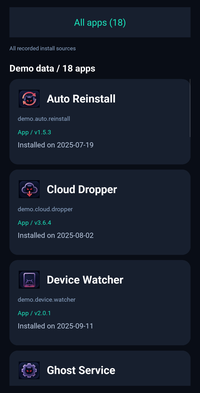
DIY #1: App Inspector#
Companion notebook for the video Android DIY #1 — Where did that app come from?
Let’s explore installed apps with PythonHere, see which installers Android associates with them, and build an interactive app browser.
Connect to Android#
Connect PythonHere to your phone and access Android’s PackageManager to inspect installed apps.
%load_ext pythonhere
%connect-there
%%there
from jnius import autoclass
from kivy.logger import Logger

activity = autoclass("org.kivy.android.PythonActivity").mActivity
pm = activity.getPackageManager()
PackageManager = autoclass("android.content.pm.PackageManager")
ApplicationInfo = autoclass("android.content.pm.ApplicationInfo")
VERSION = autoclass("android.os.Build$VERSION")
print(PackageManager)
<class 'jnius.reflect.android.content.pm.PackageManager'>
Collect apps and installation sources#
Use Android’s PackageManager to list installed apps and find their recorded installers. We’ll use this information to group apps by installation source.
%%there
def installer_name(package):
    try:
        if VERSION.SDK_INT >= 30:
            source = pm.getInstallSourceInfo(package)
            return str(source.getInstallingPackageName() or "")
        return str(pm.getInstallerPackageName(package) or "")
    except Exception as exc:
        Logger.warning(f"Packages: Install source unavailable for {package}: {exc}")
        return ""

print("PythonHere app installer is", installer_name("me.herethere.pythonhere"))
PythonHere app installer is dev.imranr.obtainium.fdroid
%%there
packages = pm.getInstalledPackages(0)

apps = []
for package in packages:
    info = package.applicationInfo
    apps.append({
        "label": str(pm.getApplicationLabel(info)),
        "package": str(package.packageName),
        "system": bool(info.flags & (
            ApplicationInfo.FLAG_SYSTEM | ApplicationInfo.FLAG_UPDATED_SYSTEM_APP
        )),
        "installer": installer_name(str(package.packageName)),
    })
apps.sort(key=lambda row: (row["label"].casefold(), row["package"]))
print(f"{len(apps)} visible apps")
18 visible apps
Group apps by installer#
Group apps by their recorded installer, so we can explore which apps belong to each source.
%%there
apps_by_installer = {}
for row in apps:
    installer = row["installer"]
    if installer not in apps_by_installer:
        apps_by_installer[installer] = []
    apps_by_installer[installer].append(row)

print(f"{len(apps_by_installer)} installer groups")
9 installer groups
Show readable installer names#
Android identifies installers by package IDs, such as com.android.vending for Google Play Store.
Let’s show readable names where available and count the apps associated with each installer.
%%there
app_labels = {}
for row in apps:
    app_labels[row["package"]] = row["label"]

installers = []
for package, installed_apps in apps_by_installer.items():
    if package:
        label = app_labels.get(package) or package
    else:
        label = "No recorded installer"
    installers.append({
        "package": package,
        "label": label,
        "count": len(installed_apps),
    })

installers.sort(key=lambda installer: installer["label"].casefold())
for installer in installers:
    print(f"{installer['label']} ({installer['count']})")
    print(f"  {installer['package'] or '(not recorded)'}")
com.android.vending (1)
  com.android.vending
com.facebook.system (1)
  com.facebook.system
com.google.android.packageinstaller (1)
  com.google.android.packageinstaller
com.samsung.android.app.omcagent (8)
  com.samsung.android.app.omcagent
com.samsung.android.themestore (1)
  com.samsung.android.themestore
com.sec.android.app.samsungapps (3)
  com.sec.android.app.samsungapps
com.sec.android.easyMover (1)
  com.sec.android.easyMover
dev.imranr.obtainium.fdroid (1)
  dev.imranr.obtainium.fdroid
No recorded installer (1)
  (not recorded)
Explore apps from one installer#
Let’s look at apps associated with a particular installer.
The example uses Samsung’s com.samsung.android.app.omcagent. You can choose any installer from your own results.
%%there
selected_installer = "com.samsung.android.app.omcagent"
selected_apps = apps_by_installer.get(selected_installer, [])
print(f"{len(selected_apps)} apps")
for row in selected_apps:
    print(f'{row["label"]:<32}  {row["package"]}')
if not selected_apps:
    print("No apps for this installer. Choose a package ID from the installer list above.")
8 apps
Auto Reinstall                    demo.auto.reinstall
Cloud Dropper                     demo.cloud.dropper
Device Watcher                    demo.device.watcher
Ghost Service                     demo.ghost.service
Hidden Layers                     demo.hidden.layers
Phantom Store                     demo.phantom.store
Silent Package                    demo.silent.package
Sneaky Paws                       demo.sneaky.paws
Open Android’s App info#
Let’s make each app card clickable, so tapping it opens Android’s built-in App info screen.
%%there
from datetime import datetime

from android.runnable import run_on_ui_thread
from kivy.clock import Clock
from kivy.properties import ObjectProperty, StringProperty
from kivy.uix.boxlayout import BoxLayout
from kivy.uix.behaviors import ButtonBehavior
from kivy.uix.label import Label
from kivy.uix.spinner import SpinnerOption


Intent = autoclass("android.content.Intent")
Uri = autoclass("android.net.Uri")
PythonActivity = autoclass("org.kivy.android.PythonActivity")
settings_status = {}


@run_on_ui_thread
def open_app_settings(package):
    """Open Android's app-info page for the tapped card."""
    try:
        activity = PythonActivity.mActivity
        intent = Intent("android.settings.APPLICATION_DETAILS_SETTINGS")
        intent.setData(Uri.parse("package:" + package))
        activity.startActivity(intent)
        settings_status.update(ok=True, package=package, error=None)
    except Exception as exc:
        Logger.exception("Packages: Could not open app settings")
        settings_status.update(ok=False, package=package, error=str(exc))
        Clock.schedule_once(show_settings_error)


def show_settings_error(_):
    package_ui.ids.status.text = "Could not open app settings"

# open_app_settings("me.herethere.pythonhere")
Load app icons#
Use PackageManager to get each app’s icon and display it in Kivy. We’ll cache the icons to keep scrolling smooth.
%%there
from io import BytesIO
from kivy.core.image import Image as CoreImage

Bitmap = autoclass("android.graphics.Bitmap")
BitmapConfig = autoclass("android.graphics.Bitmap$Config")
CompressFormat = autoclass("android.graphics.Bitmap$CompressFormat")
Canvas = autoclass("android.graphics.Canvas")
ByteArrayOutputStream = autoclass("java.io.ByteArrayOutputStream")

icon_textures = {}  # Reuse icons when a card appears again.
icon_errors = {}


def get_app_icon(package):
    if package not in icon_textures and package not in icon_errors:
        try:
            drawable = pm.getApplicationIcon(package)
            if drawable is None:  # The optional mock has no real icons.
                icon_errors[package] = "No Android icon"
                return None
            bitmap = Bitmap.createBitmap(64, 64, BitmapConfig.ARGB_8888)
            stream = ByteArrayOutputStream()
            try:
                drawable.setBounds(0, 0, 64, 64)
                drawable.draw(Canvas(bitmap))
                bitmap.compress(CompressFormat.PNG, 100, stream)
                png = bytes(value & 0xFF for value in stream.toByteArray())
            finally:
                stream.close()
                bitmap.recycle()
            icon_textures[package] = CoreImage(BytesIO(png), ext="png").texture
        except Exception as exc:
            Logger.exception(f"Packages: Icon unavailable for {package}")
            icon_errors[package] = str(exc)
    return icon_textures.get(package)
Create app cards#
Each card will show an app’s icon, name, package ID, version, and installation date.
We’ll use Kivy’s RecycleView to make the list scrollable. Tap a card to open App info.
%%there
# Appearance is defined in the KV cell below.
class InstallerOption(SpinnerOption):
    pass


class CardLabel(Label):
    pass

class InstallerCard(ButtonBehavior, BoxLayout):
    title = StringProperty("")
    package = StringProperty("")
    initials = StringProperty("")
    icon_texture = ObjectProperty(None, allownone=True)
    summary = StringProperty("")
    installed_text = StringProperty("")

    def on_package(self, *_):
        # RecycleView calls this when the card is assigned another app.
        self.icon_texture = get_app_icon(self.package) if self.package else None

    def on_release(self):
        open_app_settings(self.package)
Add an installer dropdown#
Create a dropdown with All apps and the available installers. Show the number of apps next to each option.
%%there
installer_options = {f"All apps ({len(apps)})": None}
for installer in installers:
    name = installer["label"]
    matching_names = [item for item in installers if item["label"] == name]
    if len(matching_names) > 1:
        name += f" [{installer['package']}]"
    option = f"{name} ({installer['count']})"
    installer_options[option] = installer["package"]
Filter apps by installer#
Update the app list whenever an installer is selected from the dropdown.
%%there
# Called when the dropdown selection changes.
def render_packages(*_):
    installer = installer_options[package_ui.ids.installer.text]
    if installer is None:
        matching_apps = apps
        source_text = "All recorded install sources"
    else:
        matching_apps = apps_by_installer.get(installer, [])
        source_text = installer or "Installer unknown"
    package_ui.ids.source.text = source_text
    count_text = f"{len(matching_apps)} apps"
    package_ui.ids.status.text = (
        f"Demo data / {count_text}" if getattr(pm, "is_demo", False) else count_text
    )
    cards = []
    for row in matching_apps:
        detail = package_details.get(row["package"], {})
        summary = "System app" if row["system"] else "App"
        if detail.get("version"):
            summary += " / v" + detail["version"]
        installed = detail.get("installed")
        if installed:
            installed_text = "Installed on " + installed
        else:
            installed_text = "Install date unavailable"
        cards.append({
            "title": row["label"],
            "package": row["package"],
            "initials": row["label"][:2].upper(),
            "summary": summary,
            "installed_text": installed_text,
        })
    package_ui.ids.results.data = cards
    package_ui.ids.results.scroll_y = 1
Build the Android interface#
Use Kivy’s KV language for the dropdown, scrollable cards, colors, and layout.
%%there kv -c
#:import dp kivy.metrics.dp
#:import rgba kivy.utils.get_color_from_hex

# Shared text style keeps individual labels short.
<CardLabel>:
    font_size: '14sp'
    color: rgba('#BDCCE3')
    halign: 'left'
    valign: 'middle'
    text_size: self.size
    shorten: True
    shorten_from: 'right'

<InstallerOption>:
    height: dp(54)
    font_size: '17sp'
    halign: 'left'
    padding: dp(18), 0
    text_size: self.width - dp(36), None
    background_normal: ''
    background_down: ''
    background_color: rgba('#1F4D52') if self.state == 'down' else rgba('#171F2E')
    color: rgba('#E0F0FF')

<InstallerCard>:
    orientation: 'vertical'
    padding: dp(16)
    spacing: dp(6)
    size_hint_y: None
    height: dp(164)
    canvas.before:
        Color:
            rgba: rgba('#1F404A') if self.state == 'down' else rgba('#171F2E')
        RoundedRectangle:
            pos: self.pos
            size: self.size
            radius: [dp(16)]
    BoxLayout:
        size_hint_y: None
        height: dp(44)
        spacing: dp(12)
        FloatLayout:
            size_hint_x: None
            width: dp(44)
            Image:
                texture: root.icon_texture
                allow_stretch: True
                size_hint: None, None
                size: dp(40), dp(40)
                pos_hint: {'center_x': 0.5, 'center_y': 0.5}
                opacity: 1 if root.icon_texture else 0
            CardLabel:
                text: root.initials if not root.icon_texture else ''
                font_size: '20sp'
                bold: True
                color: rgba('#1AE6BD')
                halign: 'center'
                pos_hint: {'center_x': 0.5, 'center_y': 0.5}
        CardLabel:
            text: root.title
            font_size: '21sp'
            bold: True
            color: 1, 1, 1, 1
    CardLabel:
        text: root.package
        font_size: '12sp'
        color: rgba('#8FA8C9')
        size_hint_y: None
        height: dp(20)
    CardLabel:
        text: root.summary
        font_size: '12sp'
        color: rgba('#1AE6BD')
        size_hint_y: None
        height: dp(20)
    CardLabel:
        text: root.installed_text
        valign: 'top'
        max_lines: 2

BoxLayout:
    orientation: 'vertical'
    padding: dp(18), dp(14)
    spacing: dp(10)
    canvas.before:
        Color:
            rgba: rgba('#090D16')
        Rectangle:
            pos: self.pos
            size: self.size
    Spinner:
        id: installer
        font_size: '18sp'
        size_hint_y: None
        height: dp(58)
        background_normal: ''
        background_color: rgba('#171F2E')
        color: rgba('#1AE6BD')
    Label:
        id: source
        font_size: '11sp'
        color: rgba('#8FA8C9')
        halign: 'left'
        text_size: self.size
        valign: 'middle'
        size_hint_y: None
        height: dp(22)
        shorten: True
        shorten_from: 'right'
    Label:
        id: status
        font_size: '18sp'
        bold: True
        halign: 'left'
        text_size: self.size
        size_hint_y: None
        height: dp(28)
    RecycleView:
        id: results
        viewclass: 'InstallerCard'
        do_scroll_x: False
        RecycleBoxLayout:
            default_size: None, dp(164)
            default_size_hint: 1, None
            size_hint_y: None
            height: self.minimum_height
            orientation: 'vertical'
            spacing: dp(10)
Show the browser on the phone#
Browse installed apps, check their versions and installation dates, and filter them by installer. Tap an app to open its App info screen, then use Android Back to return.
%%there
# Read app versions and install dates.
package_details = {}
package_detail_errors = []

for package in packages:
    name = str(package.packageName)
    try:
        installed = ""
        if package.firstInstallTime:
            installed = datetime.fromtimestamp(
                package.firstInstallTime / 1000
            ).strftime("%Y-%m-%d")
        package_details[name] = {
            "version": str(package.versionName or ""),
            "installed": installed,
        }
    except Exception as exc:
        Logger.warning(f"Packages: Details unavailable for {name}: {exc}")
        package_detail_errors.append({"package": name, "error": str(exc)})

print(next(iter(package_details.items())))
print("Errors:", package_detail_errors)
('demo.sneaky.paws', {'version': '2.4.1', 'installed': '2025-02-14'})
Errors: []
%%there
package_ui = root
spinner = package_ui.ids.installer
spinner.option_cls = InstallerOption
spinner.values = list(installer_options)

spinner.text = spinner.values[0]  # All apps
spinner.bind(text=render_packages)
render_packages()
Preview the result#
Take a screenshot of the Android screen and display it here in Jupyter.
%there -d 1 screenshot -w 200