
Prompt sections#
PythonHere registers project-specific prompt sections for %%there ai when the
pythonhere extension is loaded.
%load_ext pythonhere
%connect-there
Active by default#
Normal %%there ai requests use this prompt stack:
default: generic%%therecell generation rules.kivy-runtime: live Kivy app context,app,root, main-thread behavior, UI replacement, and cleanup expectations.kivy-kv: rules for generating valid Kv strings inside Python cells.android-runtime: Android availability checks and runtime diagnostics.jnius: Pyjnius usage patterns and Android Java API guardrails.android-permissions: runtime permission checks, request flows, and Android version differences.android-packages: installed package inventory patterns.android-media: MediaStore and thumbnail handling guidance.plyer: Plyer helper APIs for portable device features.
Available on request#
Use these prompt sections with --prompts when a task needs them:
%%there ai --prompts able,midi
Build a BLE ...
How prompt composition works#
%%there ai sends two chat messages to the AI provider:
a
systemmessage built by joining the selected prompt sectionsa
usermessage containing the text you wrote in the%%there aicell body
The system prompt is the active prompt stack from the sections above, joined
together in order.
When you use --prompts, those sections are appended for that request.
%%there ai --fix also adds the built-in
fix
prompt section. Its user prompt is built from the last executed Python
%%there cell plus the fix instruction you write in the %%there ai --fix
cell.
Inspect registered prompts#
If you want to see what prompt sections are available in the current notebook:
from herethere.there.ai import list_ai_prompts

list_ai_prompts()
('able',
 'android-media',
 'android-packages',
 'android-permissions',
 'android-runtime',
 'default',
 'fix',
 'jnius',
 'kivy-kv',
 'kivy-runtime',
 'midi',
 'plyer')
To inspect the complete chat request for a normal %%there ai cell, build the
messages from the same text you would put in the cell body:
from herethere.there.ai import build_messages

user_prompt = """
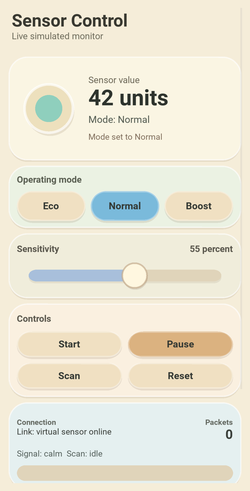
Build a soft portrait-mode control panel for simulated sensor data.
"""

messages = build_messages(user_prompt)
for message in messages:
    print("##", message["role"])
    print(message["content"])
    print()
To read one prompt section:
from herethere.there.ai import get_ai_prompt

print(get_ai_prompt("kivy-runtime"))
Register a custom prompt#
Use register_ai_prompt(...) in a notebook to add reusable prompt sections for
the current session. Registering a prompt with the same name as an existing
section replaces that section for the current notebook session.
This prompt adds visual and interaction style:
from herethere.there.ai import register_ai_prompt

register_ai_prompt("style", """## Visual style
Visual style for this Kivy prototype:

Create a light, natural-looking, toy-like interface for Android portrait mode.
The UI should feel soft, tactile, friendly, and physical, like a beautifully designed
interactive object rather than a conventional app screen.

Style goals:
- Avoid generic Material Design, dense dark dashboards, and default Kivy widget skins.
- Use a bright, airy palette with soft neutrals and gentle accent colors:
  warm white, sand, light stone, pale mint, sky blue, soft coral, muted yellow.
- Favor rounded, organic, pebble-like shapes over hard rectangles.
- Make the interface feel approachable, playful, and calm.

Visual language:
- Use soft layers, subtle shadows, rounded modules, curved dividers, and generous breathing room.
- Prefer natural grouping and flowing composition instead of rigid boxed sections.
- Controls should feel tactile, like parts of a physical toy or instrument panel.
- Use circles, capsules, blobs, rounded sliders, pill buttons, and soft segmented controls.
- Keep contrast clear, but never harsh.

Interaction:
- Buttons should feel pressable and satisfying, with clear depth and soft pressed feedback.
- Motion should be gentle and meaningful: bounce, fill, pulse, slide, or smooth transitions.
- Use animation to suggest liveliness and responsiveness, not technical intensity.

Typography and wording:
- Keep wording simple, friendly, and minimal.
- Use clear labels and compact readouts.
- Prefer approachable language over technical jargon.

Kivy implementation direction:
- Do not rely on default widget skins.
- Override backgrounds and draw custom surfaces with canvas.before / canvas.after.
- Use RoundedRectangle, Ellipse, soft borders, subtle shadow-like layering, and custom control styling.
- Favor reusable custom widgets that feel handcrafted and cohesive.

Design goal:
- The final result should clearly demonstrate that Kivy can create soft, natural,
  highly customized interfaces that feel tactile, modern, and visually distinct from standard apps.
""",
)
Use the custom prompt for the generation request:
%%there ai --prompts style
Create a Kivy Android portrait prototype for a live sensor-control demo.

The app should let the user:
- monitor one simulated sensor value
- switch between three operating modes
- adjust sensitivity with a slider
- start, pause, reset, and trigger a simulated scan
- view connection/status information
- see a progress indicator during scans
- read a compact event log of recent actions and system updates

The prototype should be self-contained and runnable.
Use simulated values and timers only; no network or external hardware is required.
Keep the layout suitable for a phone in portrait orientation.
Show code cell source
%%there
# Generated locally by %%there ai. Review before running.
from math import sin
from random import uniform
import time
from kivy.clock import Clock
from kivy.lang import Builder
from kivy.logger import Logger
from kivy.metrics import dp
from kivy.properties import BooleanProperty, ListProperty, NumericProperty, StringProperty
from kivy.uix.boxlayout import BoxLayout
from kivy.uix.button import Button
from kivy.uix.popup import Popup
from kivy.uix.label import Label
from kivy.uix.widget import Widget
from kivy.graphics import Color, RoundedRectangle, Ellipse, Line
try:
old_cleanup = globals().get("live_sensor_demo_cleanup")
if callable(old_cleanup):
old_cleanup()
except Exception:
Logger.exception("PythonHere: Could not clean up previous sensor demo")
class SoftPanel(BoxLayout):
surface_color = ListProperty([0.98, 0.95, 0.88, 1])
shadow_color = ListProperty([0.48, 0.38, 0.25, 0.13])
border_color = ListProperty([1.0, 1.0, 1.0, 0.62])
radius = NumericProperty(dp(28))
shadow_offset = ListProperty([0, -dp(3)])
class PebbleButton(Button):
active = BooleanProperty(False)
base_color = ListProperty([0.94, 0.88, 0.76, 1])
active_color = ListProperty([0.48, 0.73, 0.86, 1])
pressed_color = ListProperty([0.84, 0.69, 0.58, 1])
text_color = ListProperty([0.20, 0.22, 0.20, 1])
radius = NumericProperty(dp(24))
class SensorControlUI(BoxLayout):
sensor_value = NumericProperty(42)
sensitivity = NumericProperty(55)
mode = StringProperty("Normal")
running = BooleanProperty(False)
scanning = BooleanProperty(False)
progress = NumericProperty(0)
packet_count = NumericProperty(0)
status_text = StringProperty("Ready")
connection_text = StringProperty("Link: virtual sensor online")
signal_text = StringProperty("Signal: calm")
progress_text = StringProperty("Scan: idle")
log_text = StringProperty("")
class SensorOrb(Widget):
value = NumericProperty(42)
def __init__(self, **kwargs):
super().__init__(**kwargs)
with self.canvas:
self.shadow_color = Color(0.48, 0.38, 0.25, 0.14)
self.shadow = Ellipse()
self.outer_color = Color(0.93, 0.88, 0.74, 1)
self.outer = Ellipse()
self.fill_color = Color(0.55, 0.80, 0.74, 1)
self.fill = Ellipse()
self.ring_color = Color(1, 1, 1, 0.68)
self.ring = Line(width=dp(2.0))
self.bind(pos=self._update_canvas, size=self._update_canvas, value=self._update_canvas)
Clock.schedule_once(self._update_canvas, 0)
def _update_canvas(self, *args):
w = max(1, self.width)
h = max(1, self.height)
cx = self.center_x
cy = self.center_y
diam = min(w, h) * 0.76
outer_r = diam / 2
value_ratio = max(0, min(1, self.value / 100.0))
fill_diam = diam * (0.36 + 0.48 * value_ratio)
if value_ratio < 0.45:
self.fill_color.rgba = (0.56, 0.81, 0.74, 1)
elif value_ratio < 0.75:
self.fill_color.rgba = (0.82, 0.75, 0.43, 1)
else:
self.fill_color.rgba = (0.93, 0.48, 0.42, 1)
self.shadow.pos = (cx - outer_r + dp(2), cy - outer_r - dp(5))
self.shadow.size = (diam, diam)
self.outer.pos = (cx - outer_r, cy - outer_r)
self.outer.size = (diam, diam)
self.fill.pos = (cx - fill_diam / 2, cy - fill_diam / 2)
self.fill.size = (fill_diam, fill_diam)
self.ring.circle = (cx, cy, outer_r)
class SoftSlider(Widget):
value = NumericProperty(55)
min_value = NumericProperty(0)
max_value = NumericProperty(100)
def __init__(self, **kwargs):
super().__init__(**kwargs)
self._grabbed = False
with self.canvas:
self.shadow_color = Color(0.45, 0.35, 0.24, 0.10)
self.shadow = RoundedRectangle(radius=[dp(12)])
self.track_color = Color(0.88, 0.83, 0.73, 1)
self.track = RoundedRectangle(radius=[dp(12)])
self.fill_color = Color(0.53, 0.76, 0.82, 1)
self.fill = RoundedRectangle(radius=[dp(12)])
self.knob_shadow_color = Color(0.45, 0.35, 0.24, 0.16)
self.knob_shadow = Ellipse()
self.knob_color = Color(1.0, 0.97, 0.88, 1)
self.knob = Ellipse()
self.knob_line_color = Color(0.76, 0.66, 0.54, 0.65)
self.knob_line = Line(width=dp(1.25))
self.bind(pos=self._update_canvas, size=self._update_canvas, value=self._update_canvas)
Clock.schedule_once(self._update_canvas, 0)
def _ratio(self):
span = max(0.001, self.max_value - self.min_value)
return max(0, min(1, (self.value - self.min_value) / span))
def _set_value_from_x(self, x):
left = self.x + dp(18)
width = max(1, self.width - dp(36))
ratio = max(0, min(1, (x - left) / width))
self.value = self.min_value + ratio * (self.max_value - self.min_value)
def _update_canvas(self, *args):
left = self.x + dp(18)
width = max(1, self.width - dp(36))
track_h = dp(18)
y = self.center_y - track_h / 2
ratio = self._ratio()
fill_w = width * ratio
knob_d = dp(38)
knob_x = left + fill_w - knob_d / 2
if ratio < 0.45:
self.fill_color.rgba = (0.55, 0.80, 0.74, 1)
elif ratio < 0.75:
self.fill_color.rgba = (0.66, 0.75, 0.86, 1)
else:
self.fill_color.rgba = (0.94, 0.58, 0.50, 1)
self.shadow.pos = (left, y - dp(3))
self.shadow.size = (width, track_h)
self.track.pos = (left, y)
self.track.size = (width, track_h)
self.fill.pos = (left, y)
self.fill.size = (max(0, fill_w), track_h)
self.knob_shadow.pos = (knob_x + dp(1), self.center_y - knob_d / 2 - dp(3))
self.knob_shadow.size = (knob_d, knob_d)
self.knob.pos = (knob_x, self.center_y - knob_d / 2)
self.knob.size = (knob_d, knob_d)
self.knob_line.circle = (knob_x + knob_d / 2, self.center_y, knob_d / 2)
def on_touch_down(self, touch):
if self.collide_point(*touch.pos):
self._grabbed = True
touch.grab(self)
self._set_value_from_x(touch.x)
return True
return super().on_touch_down(touch)
def on_touch_move(self, touch):
if touch.grab_current is self:
self._set_value_from_x(touch.x)
return True
return super().on_touch_move(touch)
def on_touch_up(self, touch):
if touch.grab_current is self:
self._set_value_from_x(touch.x)
touch.ungrab(self)
self._grabbed = False
return True
return super().on_touch_up(touch)
class SoftProgress(Widget):
progress = NumericProperty(0)
running = BooleanProperty(False)
def __init__(self, **kwargs):
super().__init__(**kwargs)
with self.canvas:
self.track_color = Color(0.88, 0.83, 0.73, 1)
self.track = RoundedRectangle(radius=[dp(13)])
self.fill_color = Color(0.55, 0.80, 0.74, 1)
self.fill = RoundedRectangle(radius=[dp(13)])
self.shine_color = Color(1, 1, 1, 0.35)
self.shine = RoundedRectangle(radius=[dp(10)])
self.bind(pos=self._update_canvas, size=self._update_canvas, progress=self._update_canvas, running=self._update_canvas)
Clock.schedule_once(self._update_canvas, 0)
def _update_canvas(self, *args):
p = max(0, min(1, self.progress))
self.track.pos = self.pos
self.track.size = self.size
self.fill.pos = self.pos
self.fill.size = (self.width * p, self.height)
self.shine.pos = (self.x + dp(4), self.y + self.height * 0.56)
self.shine.size = (max(0, self.width * p - dp(8)), self.height * 0.22)
if self.running:
self.fill_color.rgba = (0.55, 0.80, 0.74, 1)
else:
self.fill_color.rgba = (0.72, 0.72, 0.66, 1)
KV = """
#:import dp kivy.metrics.dp
#:import sp kivy.metrics.sp
<SoftPanel>:
canvas.before:
Color:
rgba: root.shadow_color
RoundedRectangle:
pos: self.x + root.shadow_offset[0], self.y + root.shadow_offset[1]
size: self.size
radius: [root.radius]
Color:
rgba: root.surface_color
RoundedRectangle:
pos: self.pos
size: self.size
radius: [root.radius]
canvas.after:
Color:
rgba: root.border_color
Line:
rounded_rectangle: self.x, self.y, self.width, self.height, root.radius
width: dp(1)
<PebbleButton>:
background_normal: ""
background_down: ""
background_color: 0, 0, 0, 0
color: root.text_color
font_size: sp(15)
bold: True
halign: "center"
valign: "middle"
text_size: self.size
canvas.before:
Color:
rgba: 0.46, 0.36, 0.25, 0.14
RoundedRectangle:
pos: self.x, self.y - dp(3)
size: self.size
radius: [root.radius]
Color:
rgba: root.pressed_color if root.state == "down" else (root.active_color if root.active else root.base_color)
RoundedRectangle:
pos: self.pos
size: self.size
radius: [root.radius]
Color:
rgba: 1, 1, 1, 0.34
Line:
rounded_rectangle: self.x + dp(1), self.y + dp(1), self.width - dp(2), self.height - dp(2), root.radius
width: dp(1)
SensorControlUI:
orientation: "vertical"
padding: dp(12)
canvas.before:
Color:
rgba: 0.96, 0.93, 0.85, 1
Rectangle:
pos: self.pos
size: self.size
ScrollView:
do_scroll_x: False
bar_width: dp(3)
scroll_type: ["bars", "content"]
BoxLayout:
id: body
orientation: "vertical"
size_hint_y: None
height: self.minimum_height
spacing: dp(10)
padding: dp(2), dp(4), dp(2), dp(12)
BoxLayout:
orientation: "vertical"
size_hint_y: None
height: dp(62)
padding: dp(4), 0
Label:
text: "Sensor Control"
color: 0.22, 0.22, 0.19, 1
font_size: sp(27)
bold: True
halign: "left"
valign: "bottom"
text_size: self.size
Label:
text: "Live simulated monitor"
color: 0.43, 0.42, 0.36, 1
font_size: sp(14)
halign: "left"
valign: "top"
text_size: self.size
SoftPanel:
orientation: "horizontal"
size_hint_y: None
height: dp(158)
padding: dp(12)
spacing: dp(12)
surface_color: 0.98, 0.96, 0.89, 1
SensorOrb:
value: root.sensor_value
size_hint_x: 0.44
BoxLayout:
orientation: "vertical"
spacing: dp(3)
Label:
text: "Sensor value"
color: 0.42, 0.40, 0.34, 1
font_size: sp(14)
halign: "left"
valign: "bottom"
text_size: self.size
Label:
text: "{} units".format(int(root.sensor_value))
color: 0.18, 0.20, 0.18, 1
font_size: sp(34)
bold: True
halign: "left"
valign: "middle"
text_size: self.size
Label:
text: "Mode: " + root.mode
color: 0.32, 0.35, 0.31, 1
font_size: sp(15)
halign: "left"
valign: "middle"
text_size: self.size
Label:
text: root.status_text
color: 0.50, 0.43, 0.36, 1
font_size: sp(13)
halign: "left"
valign: "top"
text_size: self.size
SoftPanel:
orientation: "vertical"
size_hint_y: None
height: dp(94)
padding: dp(12), dp(10)
spacing: dp(8)
surface_color: 0.92, 0.95, 0.89, 1
Label:
text: "Operating mode"
color: 0.35, 0.37, 0.32, 1
font_size: sp(14)
bold: True
size_hint_y: None
height: dp(20)
halign: "left"
valign: "middle"
text_size: self.size
BoxLayout:
spacing: dp(8)
PebbleButton:
id: mode_eco
text: "Eco"
PebbleButton:
id: mode_normal
text: "Normal"
PebbleButton:
id: mode_boost
text: "Boost"
SoftPanel:
orientation: "vertical"
size_hint_y: None
height: dp(98)
padding: dp(12), dp(10)
spacing: dp(5)
surface_color: 0.94, 0.93, 0.86, 1
BoxLayout:
size_hint_y: None
height: dp(25)
Label:
text: "Sensitivity"
color: 0.35, 0.34, 0.30, 1
font_size: sp(14)
bold: True
halign: "left"
valign: "middle"
text_size: self.size
Label:
text: "{} percent".format(int(root.sensitivity))
color: 0.35, 0.34, 0.30, 1
font_size: sp(14)
bold: True
halign: "right"
valign: "middle"
text_size: self.size
SoftSlider:
id: sensitivity_slider
value: root.sensitivity
size_hint_y: None
height: dp(48)
SoftPanel:
orientation: "vertical"
size_hint_y: None
height: dp(142)
padding: dp(12)
spacing: dp(10)
surface_color: 0.98, 0.94, 0.88, 1
Label:
text: "Controls"
color: 0.35, 0.34, 0.30, 1
font_size: sp(14)
bold: True
size_hint_y: None
height: dp(20)
halign: "left"
valign: "middle"
text_size: self.size
GridLayout:
cols: 2
spacing: dp(9)
PebbleButton:
id: start_button
text: "Start"
active_color: 0.54, 0.78, 0.63, 1
PebbleButton:
id: pause_button
text: "Pause"
active_color: 0.86, 0.70, 0.50, 1
PebbleButton:
id: scan_button
text: "Scan"
active_color: 0.54, 0.74, 0.88, 1
PebbleButton:
id: reset_button
text: "Reset"
active_color: 0.94, 0.62, 0.55, 1
SoftPanel:
orientation: "vertical"
size_hint_y: None
height: dp(132)
padding: dp(12)
spacing: dp(8)
surface_color: 0.90, 0.94, 0.94, 1
BoxLayout:
size_hint_y: None
height: dp(47)
spacing: dp(8)
BoxLayout:
orientation: "vertical"
Label:
text: "Connection"
color: 0.39, 0.41, 0.38, 1
font_size: sp(12)
bold: True
halign: "left"
valign: "bottom"
text_size: self.size
Label:
text: root.connection_text
color: 0.22, 0.24, 0.22, 1
font_size: sp(13)
halign: "left"
valign: "top"
text_size: self.size
BoxLayout:
orientation: "vertical"
size_hint_x: 0.52
Label:
text: "Packets"
color: 0.39, 0.41, 0.38, 1
font_size: sp(12)
bold: True
halign: "right"
valign: "bottom"
text_size: self.size
Label:
text: str(int(root.packet_count))
color: 0.22, 0.24, 0.22, 1
font_size: sp(20)
bold: True
halign: "right"
valign: "top"
text_size: self.size
Label:
text: root.signal_text + " " + root.progress_text
color: 0.33, 0.38, 0.36, 1
font_size: sp(13)
size_hint_y: None
height: dp(20)
halign: "left"
valign: "middle"
text_size: self.size
SoftProgress:
progress: root.progress
running: root.scanning
size_hint_y: None
height: dp(24)
SoftPanel:
orientation: "vertical"
size_hint_y: None
height: dp(150)
padding: dp(12)
spacing: dp(6)
surface_color: 0.97, 0.92, 0.86, 1
Label:
text: "Recent log"
color: 0.35, 0.34, 0.30, 1
font_size: sp(14)
bold: True
size_hint_y: None
height: dp(22)
halign: "left"
valign: "middle"
text_size: self.size
ScrollView:
id: log_scroll
do_scroll_x: False
bar_width: dp(2)
Label:
id: event_log
text: root.log_text
color: 0.31, 0.30, 0.27, 1
font_size: sp(12)
line_height: 1.12
halign: "left"
valign: "top"
text_size: self.width, None
size_hint_y: None
height: self.texture_size[1] + dp(8)
"""
class SensorDemoController:
def __init__(self, ui):
self.ui = ui
self.phase = 0.0
self.logs = []
self.sensor_event = None
self.scan_event = None
self.cleaned = False
self.modes = {
"Eco": {"base": 34, "speed": 0.75},
"Normal": {"base": 52, "speed": 1.0},
"Boost": {"base": 70, "speed": 1.35},
}
ui.ids.start_button.bind(on_release=self.start)
ui.ids.pause_button.bind(on_release=self.pause)
ui.ids.reset_button.bind(on_release=self.reset)
ui.ids.scan_button.bind(on_release=self.trigger_scan)
ui.ids.mode_eco.bind(on_release=lambda instance: self.set_mode("Eco"))
ui.ids.mode_normal.bind(on_release=lambda instance: self.set_mode("Normal"))
ui.ids.mode_boost.bind(on_release=lambda instance: self.set_mode("Boost"))
ui.ids.sensitivity_slider.bind(value=self.on_sensitivity)
self.sensor_event = Clock.schedule_interval(self.update_sensor, 0.22)
self.set_mode("Normal", log_event=False)
self.add_log("Demo ready")
self.store_state()
def cleanup(self):
self.cleaned = True
if self.sensor_event is not None:
self.sensor_event.cancel()
self.sensor_event = None
if self.scan_event is not None:
self.scan_event.cancel()
self.scan_event = None
def add_log(self, message):
stamp = time.strftime("%H:%M:%S")
self.logs.insert(0, stamp + " " + message)
self.logs = self.logs[:8]
self.ui.log_text = "\n".join(self.logs)
self.store_state()
def store_state(self):
globals()["live_sensor_demo_state"] = {
"ok": True,
"running": bool(self.ui.running),
"scanning": bool(self.ui.scanning),
"sensor_value": round(float(self.ui.sensor_value), 2),
"sensitivity": round(float(self.ui.sensitivity), 2),
"mode": str(self.ui.mode),
"progress": round(float(self.ui.progress), 3),
"status": str(self.ui.status_text),
"connection": str(self.ui.connection_text),
"signal": str(self.ui.signal_text),
"packets": int(self.ui.packet_count),
"recent_log": list(self.logs),
}
def update_buttons(self):
self.ui.ids.mode_eco.active = self.ui.mode == "Eco"
self.ui.ids.mode_normal.active = self.ui.mode == "Normal"
self.ui.ids.mode_boost.active = self.ui.mode == "Boost"
self.ui.ids.start_button.active = self.ui.running and not self.ui.scanning
self.ui.ids.pause_button.active = not self.ui.running and not self.ui.scanning
self.ui.ids.scan_button.active = self.ui.scanning
self.ui.ids.reset_button.active = False
self.ui.ids.scan_button.text = "Scanning" if self.ui.scanning else "Scan"
def set_mode(self, mode_name, log_event=True):
if mode_name not in self.modes:
return
self.ui.mode = mode_name
self.ui.status_text = "Mode set to " + mode_name
self.update_buttons()
if log_event:
self.add_log("Mode changed to " + mode_name)
self.store_state()
def on_sensitivity(self, slider, value):
self.ui.sensitivity = max(0, min(100, value))
self.ui.status_text = "Sensitivity adjusted"
if int(value) % 10 == 0:
self.store_state()
self.update_buttons()
def start(self, *args):
self.ui.running = True
self.ui.status_text = "Monitoring active"
self.ui.connection_text = "Link: virtual sensor online"
self.ui.signal_text = "Signal: streaming"
self.update_buttons()
self.add_log("Monitoring started")
def pause(self, *args):
self.ui.running = False
self.ui.status_text = "Monitoring paused"
self.ui.signal_text = "Signal: holding"
self.update_buttons()
self.add_log("Monitoring paused")
def reset(self, *args):
if self.scan_event is not None:
self.scan_event.cancel()
self.scan_event = None
self.ui.running = False
self.ui.scanning = False
self.ui.progress = 0
self.ui.progress_text = "Scan: idle"
self.ui.sensor_value = 42
self.ui.packet_count = 0
self.ui.sensitivity = 55
self.ui.ids.sensitivity_slider.value = 55
self.phase = 0.0
self.set_mode("Normal", log_event=False)
self.ui.status_text = "Reset complete"
self.ui.signal_text = "Signal: calm"
self.update_buttons()
self.add_log("System reset")
def trigger_scan(self, *args):
if self.ui.scanning:
self.add_log("Scan already running")
return
self.ui.scanning = True
self.ui.progress = 0
self.ui.progress_text = "Scan: 0 percent"
self.ui.status_text = "Scan running"
self.ui.signal_text = "Signal: sampling"
if self.scan_event is not None:
self.scan_event.cancel()
self.scan_event = Clock.schedule_interval(self.update_scan, 0.08)
self.update_buttons()
self.add_log("Simulated scan started")
def update_scan(self, dt):
if self.cleaned:
return False
self.ui.progress = min(1, self.ui.progress + dt / 4.0)
self.ui.progress_text = "Scan: {} percent".format(int(self.ui.progress * 100))
if self.ui.progress >= 1:
self.ui.progress = 1
self.ui.scanning = False
self.ui.status_text = "Scan complete"
self.ui.signal_text = "Signal: stable"
self.ui.progress_text = "Scan: complete"
if self.scan_event is not None:
self.scan_event.cancel()
self.scan_event = None
self.update_buttons()
self.add_log("Scan completed")
return False
self.store_state()
return True
def update_sensor(self, dt):
if self.cleaned:
return False
if not self.ui.running and not self.ui.scanning:
self.store_state()
return True
mode_info = self.modes.get(self.ui.mode, self.modes["Normal"])
self.phase += dt * mode_info["speed"] * (0.8 + self.ui.sensitivity / 80.0)
sensitivity_ratio = self.ui.sensitivity / 100.0
wave = sin(self.phase) * (8 + 18 * sensitivity_ratio)
fine_wave = sin(self.phase * 2.7) * (2 + 5 * sensitivity_ratio)
jitter = uniform(-1.2, 1.2) * (0.4 + sensitivity_ratio)
scan_lift = 6 * sin(self.ui.progress * 3.14159) if self.ui.scanning else 0
value = mode_info["base"] + wave + fine_wave + jitter + scan_lift
self.ui.sensor_value = max(0, min(100, value))
self.ui.packet_count += 1
if self.ui.scanning:
self.ui.status_text = "Scanning sensor field"
self.ui.signal_text = "Signal: sampling"
elif self.ui.running:
if self.ui.sensor_value > 82:
self.ui.status_text = "High reading"
self.ui.signal_text = "Signal: lively"
elif self.ui.sensor_value < 25:
self.ui.status_text = "Low reading"
self.ui.signal_text = "Signal: quiet"
else:
self.ui.status_text = "Monitoring active"
self.ui.signal_text = "Signal: stable"
self.store_state()
return True
def build_live_sensor_demo():
ui = Builder.load_string(KV)
if ui is None:
raise RuntimeError("Builder.load_string returned None for sensor demo UI")
controller = SensorDemoController(ui)
def cleanup_live_sensor_demo():
controller.cleanup()
globals()["live_sensor_demo_ui"] = ui
globals()["live_sensor_demo_controller"] = controller
globals()["live_sensor_demo_cleanup"] = cleanup_live_sensor_demo
root.clear_widgets()
root.add_widget(ui)
return ui
try:
build_live_sensor_demo()
except Exception as exc:
Logger.exception("PythonHere: Could not build live sensor demo")
globals()["pythonhere_last_error"] = {
"stage": "build_live_sensor_demo",
"error": f"{type(exc).__name__}: {exc}",
}
popup = Popup(
title="Sensor demo error",
content=Label(
text="Could not build the sensor demo.\n" + f"{type(exc).__name__}: {exc}",
halign="center",
valign="middle",
),
size_hint=(0.88, 0.42),
)
popup.open()
%there -d 1 screenshot -w 250
Override the session stack#
Use set_ai_prompts(...) when a notebook should use a different base prompt
stack for every request in the current kernel session:
from herethere.there.ai import clear_ai_prompts, set_ai_prompts

set_ai_prompts("default", "kivy-runtime", "style")
Clear the session override to return to the configured default stack:
clear_ai_prompts()